

This is not how I planned this weekend, and definitely not what this post was supposed to be about. I wanted to tell you about a great book I've been reading and share some experiences from building my own LLM, but that will have to wait.
If you're not feeling like reading all of this, instead, just watch this classic video instead. Whole situation just reminded me of it 😄
As you know (do you?), I have 16+ servers running in my basement. I host quite a lot there - mostly lower-importance community websites and services, plus a bunch of services I run for myself.
It's extremely rare for something there to simply stop working. But, well. It happens. On Friday afternoon - because of course these things happen on Friday afternoon - my external monitoring started reporting that my public services were disappearing from the Internet, one after another. Meh.
The problem itself turned out to be rather ordinary: my ISP screwed something up. The workaround, however, was a bit less ordinary. So I thought it might be worth writing about.
Something is wrong with the Internet
It started with monitoring alerts. One website went down, then another, and soon it became obvious that this wasn't a problem with any particular service nor DB. Pretty much everything exposed through my public nginx load balancers had become unreachable from the Internet.
The obvious suspect was DNS. NOT THIS TIME (yes, I know 😄). I really hoped for this, it would be easier in my case. But I already knew it's not DNS this time, since various domains are hosted on different providers.
Next suspect: nginx. I run two nginx load balancers with a virtual IP managed by keepalived - this is my edge setup. (Un)fortunately - all good here.
Then came the edge router (Mikrotik on RouterOS). I hoped that I made some manual changes recently, and then forgot to save, and it got rebooted, but also - no.
In other words - I really didn't change anything for a longer time. I was on holidays! 😃
So I started suspecting my ISP. Weird thing, since I haven't had a single failure since I started using their services - be it 10 years or more! Not even one. But well - there's always this first time.
So I started testing from outside my network. And this is where things started getting interesting. A regular traceroute reached my public IP just fine. A TCP traceroute to port 443, however, did not. Connecting directly to the public IP on either port 80 or 443 simply timed out. So I started capturing packets. And for a connection attempt from one of the affected external networks... nothing arrived. No TCP SYN on the nginx host, which wasn't particularly surprising at this point — but, more importantly, no SYN appeared on the WAN interface of my MikroTik router either.
The packet wasn't being rejected by nginx. It wasn't being dropped by keepalived, Linux, NAT or my firewall.
It wasn't reaching my network at all.

At the time of writing I still don't know exactly what broke on the ISP side. The important part for this story is that I had narrowed it down far enough: selected inbound TCP traffic wasn't reaching my WAN interface, while outbound connectivity remained perfectly healthy. Whatever the root cause was, I couldn't fix it from my side.
Best effort means best effort
Before going further with the investigation, there is one important bit of context.
My basement data center hosts more than twenty different services. Some are just for me and my family, while others are public websites and community services used by other people. Still, none of them comes with a five-nines availability promise. The SLA is simple:
Best effort. And this is the way.
The first alerts started coming in on Friday afternoon. I had other plans, so I acknowledged that something was broken... and left it broken. I didn't actually start investigating until Saturday.
Years of running services from home have taught me that this is a much healthier way to approach it. First, transient failures happen. Sometimes waiting a few hours is a perfectly reasonable troubleshooting technique. Things recover, upstream problems get fixed, routes converge, or whatever was temporarily broken simply stops being broken.
More importantly, though, I've learned not to set unrealistic expectations for infrastructure like this. It works very well - probably 99% of the time nobody, including me, can tell that these services are running from a bunch of machines in a basement rather than from some cloud region. It's the remaining 1% you need to be prepared for.
I could design everything for higher availability. I could have redundant ISPs, redundant upstream paths, automatic failover, redundant power supplies and enough monitoring to wake me up the moment a packet gets lost somewhere. But really, plz, I have a life 😄
So when something like this happens, I see the objective as understanding what happened, fixing or working around it without unnecessary pressure, and ideally learning something useful along the way. And this time, there was quite a lot to learn.
Routing around the problem
By Saturday it was pretty clear that fixing the actual problem was outside my network. I contacted my ISP and provided them with packet captures, traceroutes and examples of source networks from which connections were failing. Unfortunately, this is a small local ISP, I'm not a business customer and there is no SLA requiring someone to immediately take action for my basement. The problem also didn't look particularly trivial, so I expected the investigation to take some time.
That left me with another question: can I simply route around the broken path until they get it figured out?
So instead of having the Internet connect to me, I could connect to the Internet first - and carry the web traffic back through that connection.
So instead of waiting for the Internet to establish a TCP connection towards me, I could establish a persistent connection from inside my network to somewhere on the Internet and carry incoming web traffic back through it.
My first idea was a small VPS somewhere - Hetzner, OVH, or pretty much any provider with decent connectivity. Put nginx on it, establish a reverse tunnel from my data center, and make the VPS the new public entry point. The simplest version could use plain SSH. Something inside my network could maintain a reverse port forwarding session such as:
ssh -N -R 127.0.0.1:8443:<INTERNAL-LB>:443 tunnel@example-vpsThen nginx on the VPS would accept public HTTPS traffic and forward it to 127.0.0.1:8443, which would actually travel through the SSH connection back to my existing load balancer.
There are, of course, much nicer tools for doing this. Projects such as frp or rathole are specifically designed for exposing services behind NAT or firewalls through reverse tunnels. WireGuard would be another option, with the VPS acting as an Internet-facing router and the tunnel providing connectivity back home. And all of these would work.
But then I started counting what my quick workaround would need: a VPS, its configuration, nginx or HAProxy, TLS certificates, tunnel supervision, firewall rules, monitoring, patching... and preferably another VPS if I wanted the workaround itself to be highly available. A bit too much for a "workaround".
So I decided to use a ready-made version of essentially the same idea: Cloudflare Tunnel.
Why wasn't I using Cloudflare already (and still don't want to)?
At this point you might ask: if Cloudflare Tunnel solves exactly this problem, why wasn't I using it in the first place?
Well, I have a somewhat complicated relationship with Cloudflare.
First, putting Cloudflare in front of a website changes the trust model. Cloudflare terminates TLS at its edge. The connection between your browser and Cloudflare is encrypted, and the connection from Cloudflare towards my infrastructure is encrypted as well, but Cloudflare sits between those two encryption domains. In order to provide its proxying, filtering and caching features, it can process the HTTP request and response in plaintext.
That doesn't mean Cloudflare employees sit around reading people's HTTP traffic. Cloudflare describes controls around how this data is processed and accessed. But technically I am introducing a third party into a place where previously there was a TLS connection terminating directly on infrastructure I control. I generally prefer not to do that unless I have a good reason.
There is another reason.
Over the years Cloudflare has made several high-profile decisions to terminate services for customers, including The Daily Stormer in 2017, 8chan in 2019 and Kiwi Farms in 2022. I'm certainly not going to defend any of those websites. That's not the point. The question that bothers me is whether an infrastructure provider should have the power to decide who gets to remain reachable on the Internet in the first place.
Interestingly, Cloudflare itself has struggled publicly with exactly this question. After terminating The Daily Stormer, CEO Matthew Prince wrote that he had effectively woken up in a bad mood and decided that someone shouldn't be allowed on the Internet - and that nobody should have that power. Cloudflare later argued that infrastructure providers should generally avoid becoming arbiters of online content, while still reserving the ability to terminate services in exceptional circumstances and responding to valid legal requirements.
There is also a smaller, more practical annoyance. Friends of mine in APAC have repeatedly complained about legitimate browsing sessions getting Cloudflare challenges or CAPTCHAs much more frequently than what I normally experience in Europe. I've heard similar stories from Australia and New Zealand. Meh!
For those reasons I moved away from Cloudflare some years ago, but for a few domains. But now, well, you see how it goes.
Building the tunnel
Cloudflare Tunnel uses basically the same idea I had for the VPS, except that Cloudflare already operates the other end of the tunnel.
Instead of accepting connections from the Internet, I run a small cloudflared daemon inside my network. It establishes persistent outbound connections to Cloudflare. Incoming requests hit Cloudflare first and are then carried through those already established connections back to my infrastructure.
So I got from this:
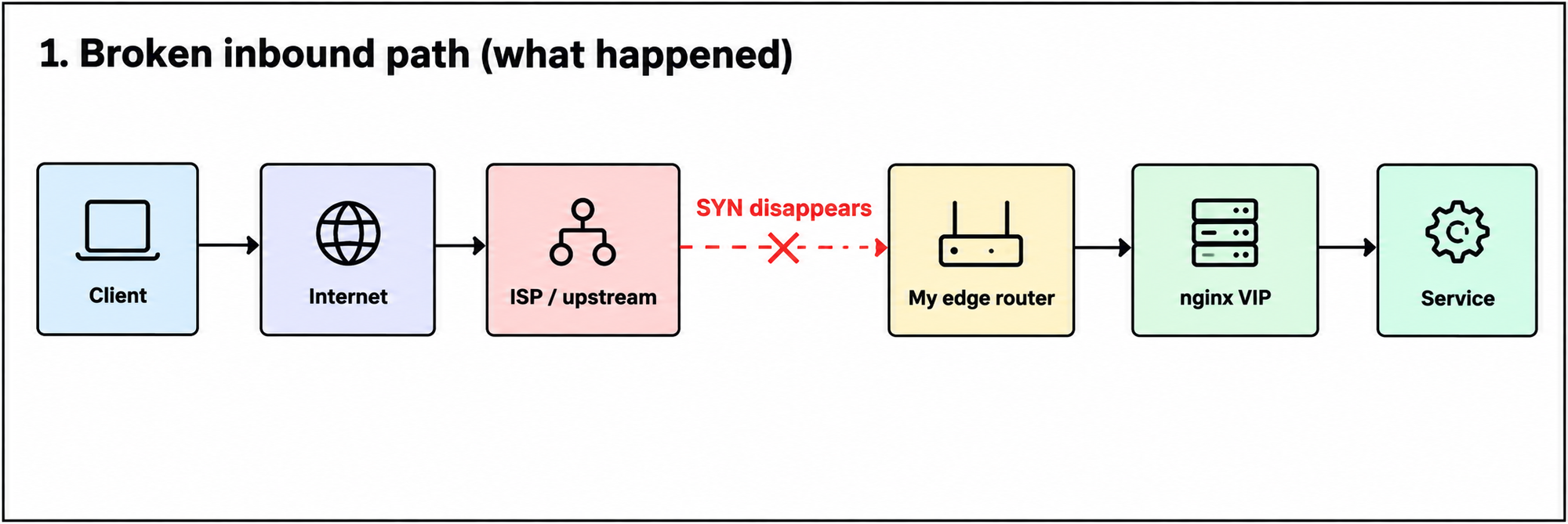
to this:
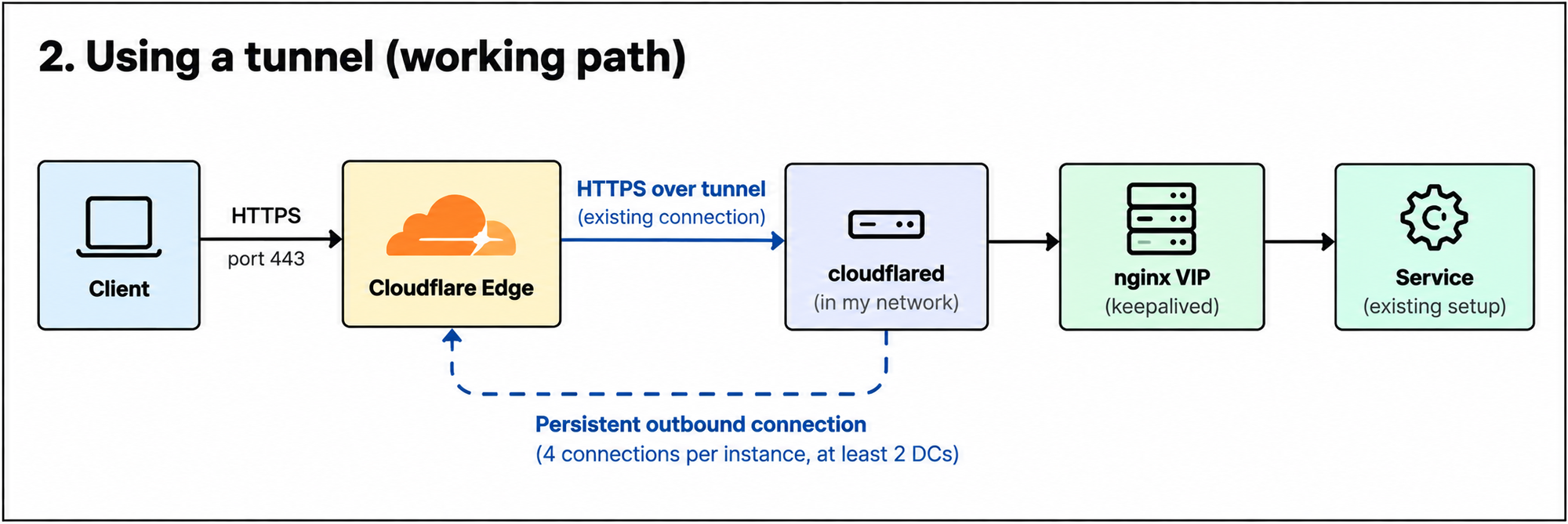
And the nicest part was that I didn't have to redesign anything behind it.
My MikroTik configuration stayed untouched - same as Nginx config and keepalived VIP. cloudflared simply forwards requests to that existing nginx VIP.
The configuration is essentially a mapping between public hostnames and the existing HTTPS endpoint:
ingress:
  - hostname: example.org
    service: https://<INTERNAL-NGINX-VIP>:443
    originRequest:
      originServerName: example.org

  - hostname: another-example.org
    service: https://<INTERNAL-NGINX-VIP>:443
    originRequest:
      originServerName: another-example.org

  - service: http_status:404
I deliberately kept TLS verification enabled between cloudflared and nginx. originServerName tells cloudflared which hostname it should expect in the certificate presented by nginx.
Making it highly available
One cloudflared process would have solved the immediate problem, but putting all public services behind a single daemon running on a single machine didn't sound particularly appealing - my Nginx setup is already HA, so why break it?.
But HA in this Cloudflare service is simple. A single cloudflared instance establishes four outbound connections to Cloudflare, spread across at least two Cloudflare data centers. I could actually see mine connecting to several Warsaw endpoints — waw02, waw03, waw04, waw06:
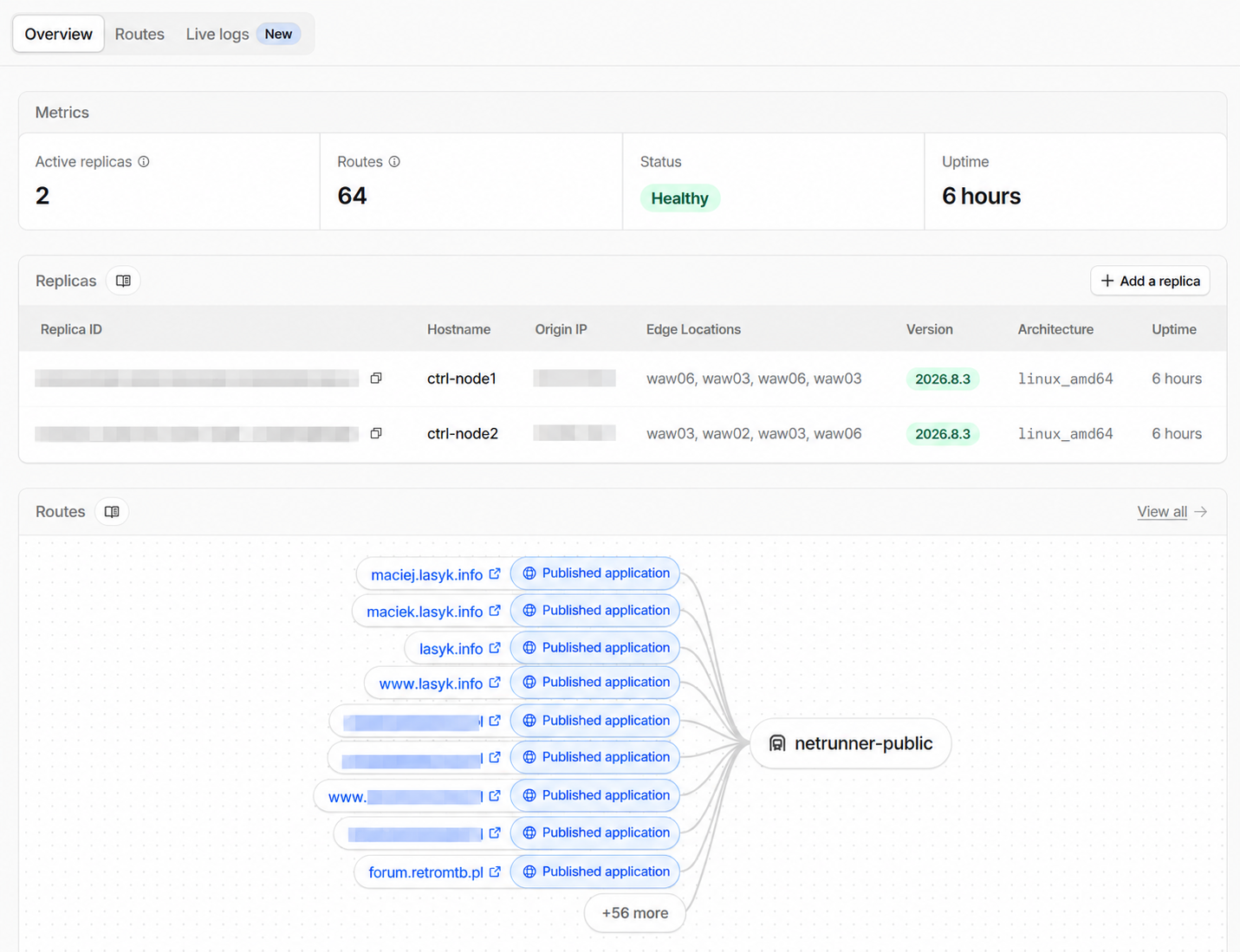
I then deployed the same tunnel on both of my load-balancer nodes:
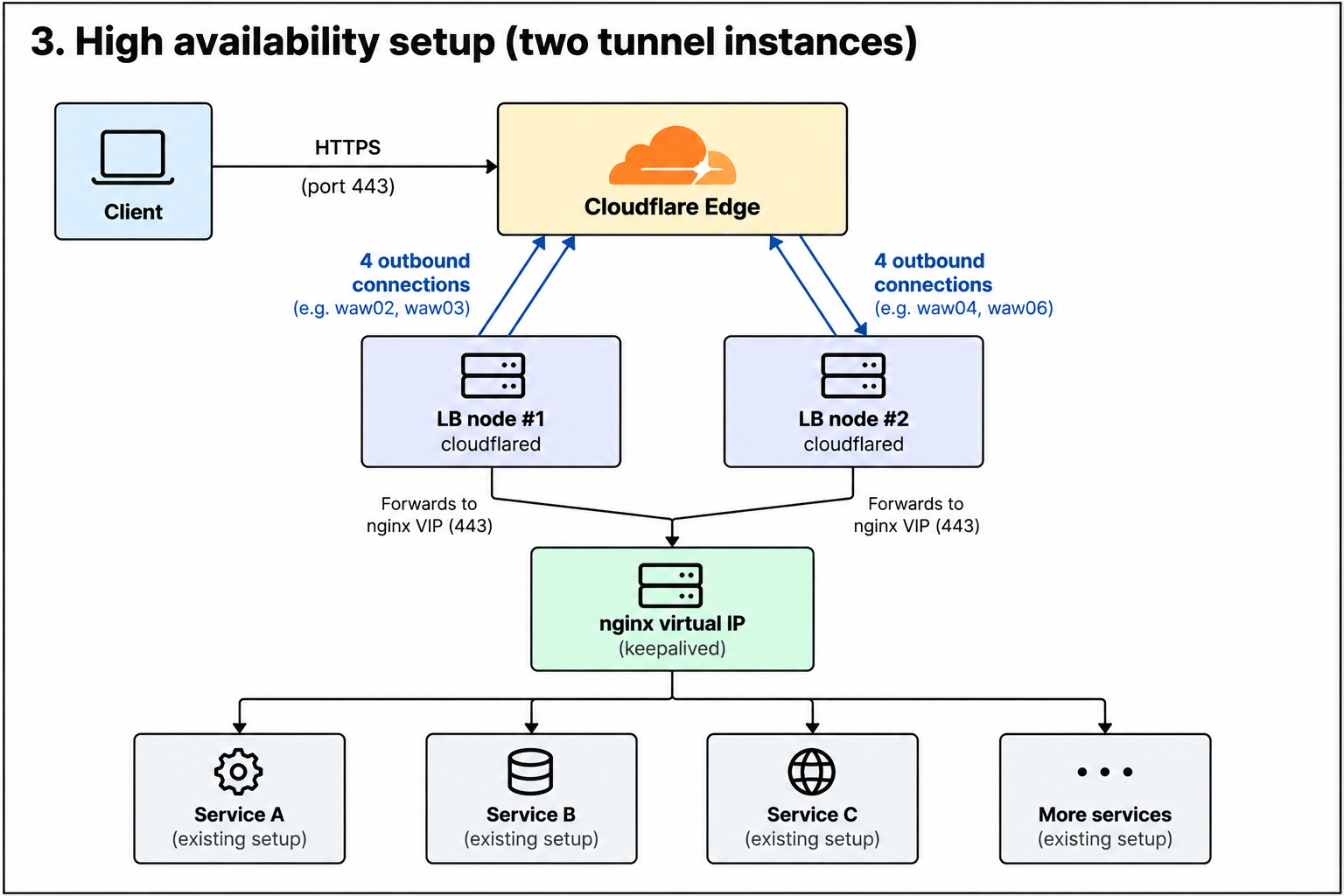
Cloudflare calls the second instance a replica. Both use the same tunnel credentials, and each maintains its own set of connections to the Cloudflare network. If one host disappears, Cloudflare can continue sending requests through the other one.
Of course I didn't just trust the diagram. I killed cloudflared on the first node and tested the websites. They kept working. Started it again, killed it on the second node, tested again. Still working. Good enough for my basement SLA 😄
So, did it work?
Yes!
The interesting part for me wasn't really Cloudflare Tunnel itself. It was realizing how easily the direction of the dependency could be reversed. My public IP had effectively become useless for web traffic, but as long as I could establish outbound connections, I could still expose the entire setup through another network.
So yes - the basement data center survived its Sev0 😃
I still don't want Cloudflare permanently sitting in front of everything I host, so this probably won't become my normal architecture. But having an outbound tunnel ready as a disaster-recovery path? Sure!
I'm already looking at how to build the same kind of fallback using open-source tooling and infrastructure I control. But that's another story.


Comments